This post contains affiliate links. We may earn a small commission when you buy through our links — at no extra cost to you.
A drone is the rare camera that can lift your vantage point from eye level to 200 feet in seconds, which is why it’s so useful for outdoor photography—and so easy to get wrong. The shot you pictured above the treeline depends on a camera that holds detail in bright sun, controls that make sense while you’re standing in wind, and a battery that doesn’t quit before the light does. A good one gets out of your way and lets you concentrate on the scene.
I’ve flown camera drones for years, and over the past seven months my team and I tested eight models in wind, at golden hour, and on hikes where every ounce matters. We focused on what shoppers ask: whether a beginner can get a stable shot without a co-pilot, whether the camera holds up in harsh light, how long a battery lasts while filming, and whether the package feels worth the money. Durability mattered too, since these get folded, packed, and landed on rough ground. The picks below made outdoor photography feel easier, not more technical.


Best for Landscape and Low Light
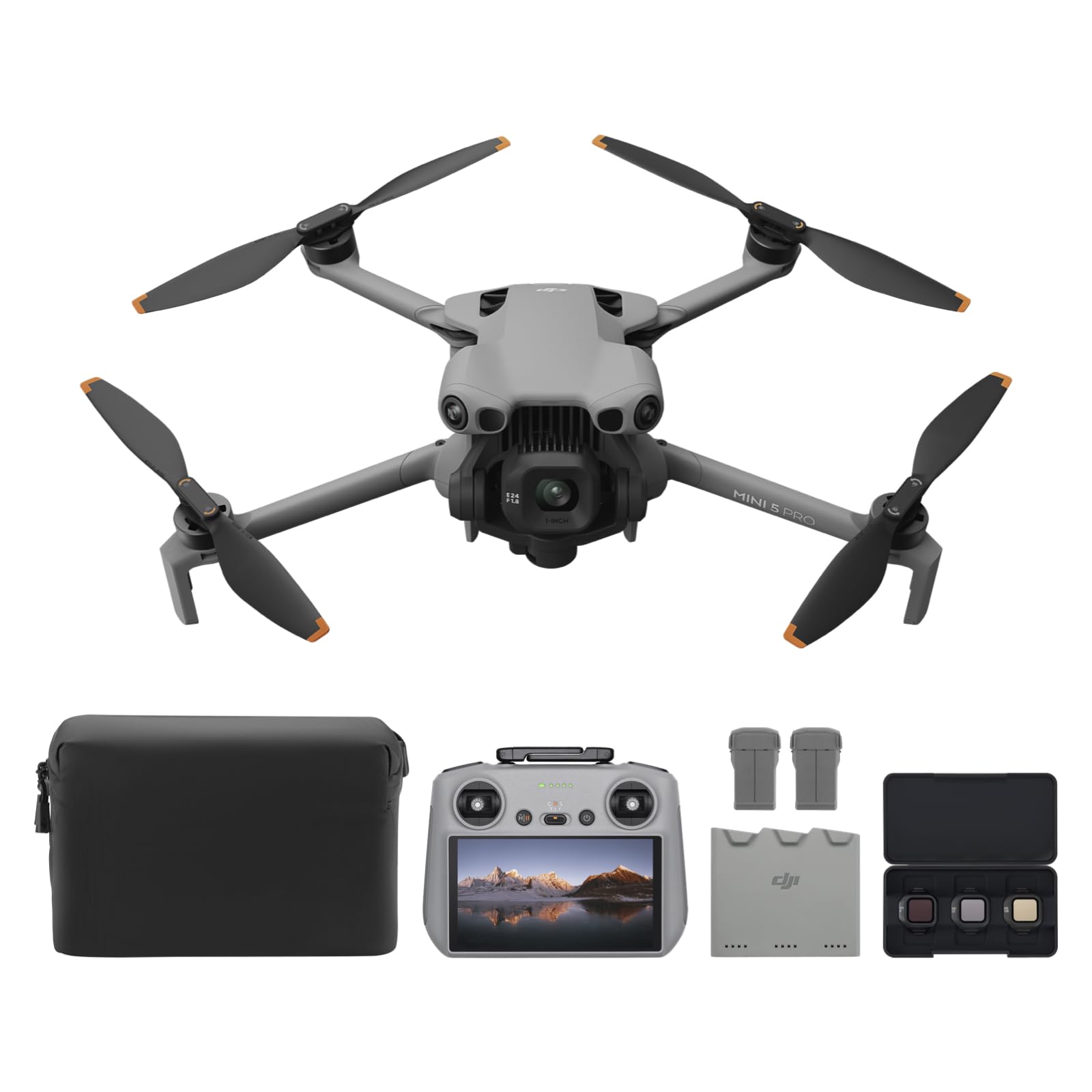
DJI Mini 5 Pro
Key Features
- Video: 4K/60fps HDR
- Sensor: 1-inch CMOS
- Stills: 50 MP
- Weight: 8.78 oz
- Price: Premium
A one-inch sensor in an airframe listed at 249 grams is the whole argument for the Mini 5 Pro, and it is why it takes the top spot here. That combination used to mean a hard case the size of a shoebox. Now it goes in a side pocket next to a water bottle.
The camera is what you are paying for: 4K/60 HDR video and 50MP stills from the 1-inch CMOS, with enough dynamic range that a backlit ridge still has something in the shadows when you open the file at home. The gimbal rotates through 225 degrees, so true vertical framing comes without cropping the shot, which matters more than it sounds for anything destined for a phone screen. In the last twenty minutes before the sun drops, it holds color and detail that the smaller sensors in this group lose.
What surprised us was how much the sensing changed the way we flew. Forward-facing LiDAR and omnidirectional vision catch trees and rock walls when the preview is at its murkiest, and return-to-home picks a route instead of retracing blindly. On a ridge at dusk that is the difference between a relaxed flight and a nervy one.
Two things to know. It is the most expensive drone in this group by a clear margin. And check your batteries in the first week rather than on the trip, because a cell that will not hold charge turns a flagship into luggage. The Plus kit earns some of the money back with three batteries, ND filters and the RC 2 remote with its own screen, so no phone clipped into the controller and no phone battery burned on a flight. The 42GB of internal storage also saved us the once we left the card in the car.
Pros
- 1-inch sensor in a 249 g aircraft
- 4K/60 HDR video and 50MP stills
- LiDAR and omnidirectional obstacle sensing
- Screen-equipped RC 2 in the Plus kit
Cons
- Highest price in this group
- Some batteries arrive unable to hold charge
If your trips are built around light and landscape, this is the drone we tell you to buy: a 1-inch sensor, 4K/60 HDR and obstacle sensing in a body you will actually carry.
Best for Travel and Stills
DJI Mini 3
Key Features
- Video: 4K HDR
- Stills: 48 MP
- Weight: 8.75 oz
- Flight time: 38 min (standard battery)
- Price: Midrange
The Mini 3 is the drone we point people toward when the budget has a ceiling but the photographs still matter. It shoots 4K HDR video and 48MP stills off a three-axis gimbal, and its dual-native-ISO sensor holds sunrise color without you nursing the exposure between frames.
The savings show up where you would expect. This is a camera-and-gimbal package rather than a sensing package: compared with the Mini 5 Pro, proximity work is on your judgment and the return-to-home button is the safety net instead of an avoidance system that steps in. Over open landscape that is an easy trade. Threading it between branches is not what it is for.
Two details decide whether it fits your workflow. The standard battery gives 38 minutes; the Intelligent Flight Battery Plus stretches that to 51 but takes the aircraft past 249 grams, which changes the registration question entirely. And stills come out as JPEG and PNG only, so if your plan involves heavy grading, this is the wrong camera for it.
Everything else is quietly good. It folds to 248 grams, handles Level 5 wind, and shoots true vertical straight from the gimbal for waterfalls and tall timber. The RC-N1 controller means your phone is the screen, which is fine for a morning and less fun by the third battery when you are also using that phone to navigate back to the trailhead.
Pros
- 4K HDR video and 48MP stills
- True vertical shooting from the gimbal
- 38 minutes on the standard battery
- 248 g and folds flat
Cons
- Battery Plus pushes it past 249 g
- Stills are JPEG and PNG only
We recommend the Mini 3 to anyone who wants publishable aerial stills without flagship money: it gives up sensing and RAW files, not image quality.
Best for Full-Day Flying
Potensic ATOM 2
Key Features
- Sensor: 1/2-inch Sony CMOS
- Stills: 48 MP
- Weight: 8.78 oz
- Flight time: 96 min (3 batteries)
- Price: Midrange
Three batteries and a hub that fills them all in about 1.3 hours is the honest pitch for the ATOM 2: 96 minutes of flying without hunting for a socket. On a hike where good light arrives in short windows, that is worth more than another megapixel.
The camera side lands closer than the price suggests. A half-inch Sony CMOS on a three-axis gimbal shoots 4K/30 HDR video, 48MP stills, 2.7K vertical and a P-Log profile for anyone who grades. Files are clean at normal viewing sizes; push a hard crop and the two DJI picks here hold more detail. For a first serious drone it is plenty, and the AI tracking, which locks onto a hiking partner and holds the frame while you watch your footing, is the feature we came back to most.
What you do not get is a safety net. There is no obstacle avoidance, so tree lines and cliff edges are yours to judge, and the map view wants a phone signal unless you pre-download the area before leaving the trailhead. Both are habits rather than dealbreakers, but they are the reason this is our long-flight pick rather than our overall one.
The transmission is the other real upgrade over the original ATOM: 10 km of range with a directional antenna on the new remote, which keeps the feed steadier when you drop behind terrain. At 249 grams it sits right on the registration line, so watch the exact configuration you fly.
Pros
- 96 minutes across three batteries
- 3-axis gimbal with 4K/30 HDR and 48MP stills
- 10 km transmission with directional antenna
- Parallel hub charges all three at once
Cons
- No obstacle avoidance
- Maps need signal or pre-downloading
Our pick when a full day of flying matters more than the last word in sharpness: three batteries, 96 minutes and a stabilized 4K camera.
Best for First Drone
Potensic ATOM SE
Key Features
- Camera: 4K/30fps with EIS
- Stills: 12 MP
- Weight: Under 249 g
- Flight time: 62 min (2 batteries)
- Price: Budget
Electronic stabilization is the compromise at the heart of the ATOM SE, and at this price we can live with it. The 1/3-inch Sony sensor and software stabilization do the work instead of a mechanical gimbal, so footage is smooth in calm air and starts to show its limits once the wind gets into it. Stills are 12MP, which is fine for a phone screen and not much beyond.
In exchange you get two batteries for 62 minutes, a beginner mode that keeps the aircraft inside sensible limits, and Level 5 wind resistance in a body under 249 grams. Setup is about as simple as this hobby gets, which is exactly what a first drone needs to be.
Our advice is to be honest about what you want from it. If photographs are the point, spend more: the ATOM 2 and the Mini 3 both add a mechanical gimbal and higher-resolution files, and you will see the difference the moment you open one at full size. If the goal is to learn to fly and come home with usable 4K, this does the job for very little money, as long as you do not expect it to outshoot the drones above it.
Pros
- Two batteries for 62 minutes total
- Under 249 g with Level 5 wind resistance
- Beginner mode and simple setup
Cons
- Electronic stabilization only, soft in wind
- 12MP stills from a small sensor
Buy the ATOM SE if you want two batteries and honest 4K for very little money, as long as you accept electronic stabilization instead of a gimbal.
Best for Open-Ground Flying
Ruko F11PRO 2

Key Features
- Video: 4K/30fps
- Stills: 19 MP
- Weight: 12.6 oz
- Flight time: 70 min (2 batteries)
- Price: Midrange
Seventy minutes across two batteries and a three-axis gimbal for about what the budget DJI costs is a tempting combination, and the F11PRO 2 largely delivers it: 4K/30 video, 6K photo mode and a hard-shell case in the box.
The live view is where it comes apart. The Wi-Fi link gives out well before the drone’s own control range, so the picture freezes and then catches up, which is fine for wide, slow passes close in and awkward when the shot you want is a long way out. That single limitation is what keeps it out of our top tier.
It is also the heaviest aircraft in this group at 357 grams, which puts it over the 250 g line and into registration territory in the US, and it carries no obstacle avoidance. None of that matters much in open country, a field, a beach, the edge of a lake, which is precisely where this drone makes sense. Fly it where the subject is far from trees and a frozen preview costs you nothing.
Small things count as well: no charger in the box, so price one in, and the rechargeable remote plus the shell case make it easy to travel with. For a first camera drone on open ground the flight time and the gimbal are real value; just do not plan on threading it between branches.
Pros
- 70 minutes across two batteries
- 3-axis gimbal with 4K/30 video
- Hard-shell case included
Cons
- Live view freezes well inside control range
- Charger not included
The F11PRO 2 is worth it for calm, wide-open flying where two batteries and a gimbal beat a longer feature list; the live view is the compromise.
Best for Short Creative Bursts
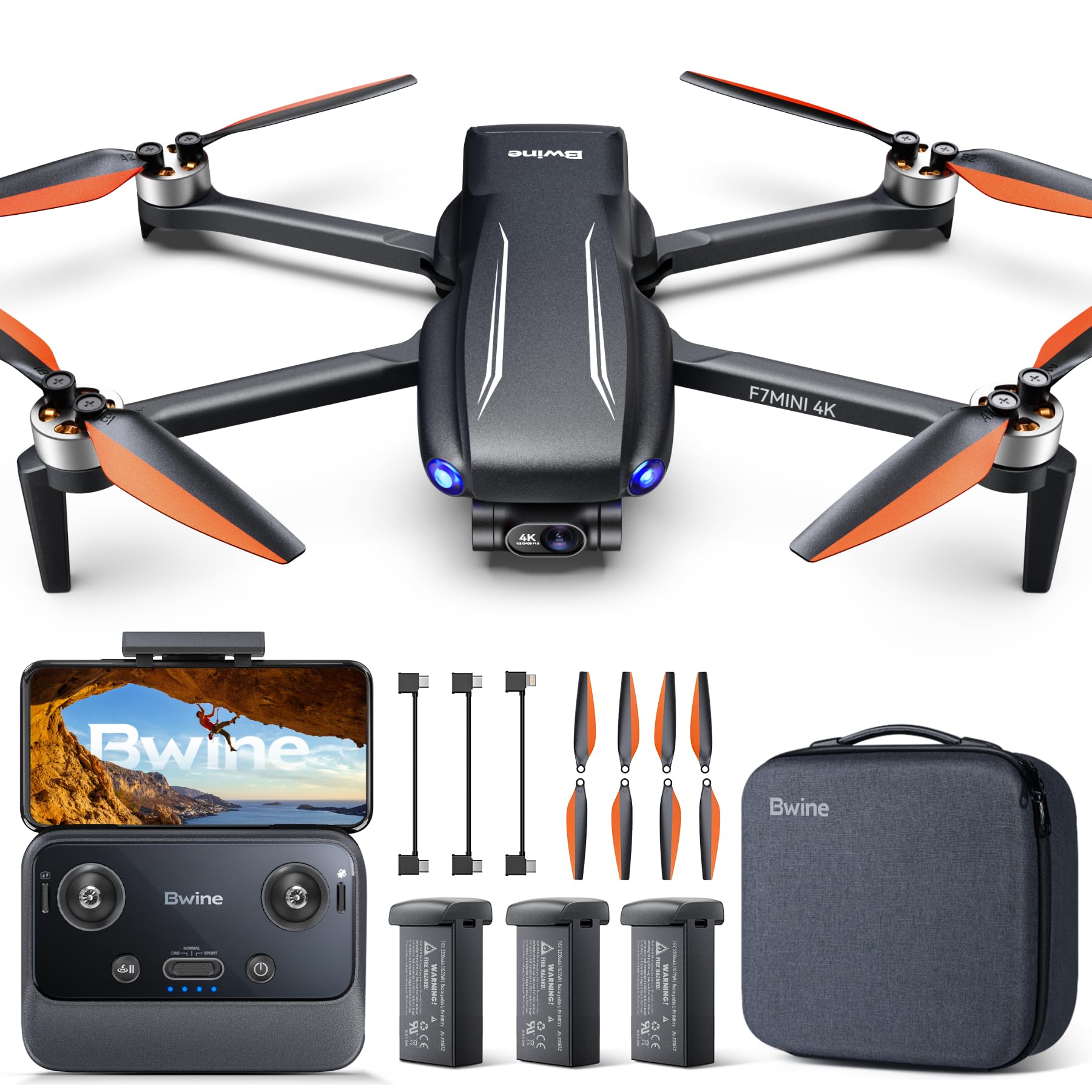
Bwine F7MINI
Key Features
- Sensor: 1/2-inch CMOS, f/1.8
- Stills: 48 MP
- Weight: 8.78 oz
- Flight time: 96 min (3 batteries)
- Price: Budget
The F7MINI advertises 96 minutes across three batteries, and that is the number to treat as a ceiling rather than a plan. Flights come in well under the quoted 32 minutes per battery once wind and hard flying get involved, so budget for a shorter session than the battery count implies.
What does hold up is the camera mount: a three-axis brushless gimbal carrying a half-inch, f/1.8 sensor that shoots 48MP stills and 4K/30 video. That is genuine mechanical stabilization at a price where electronic smoothing is the norm, and it is the reason to look at this drone at all. The 6 km transmission figure is a best case, but the footage itself is steady.
Our read is that it is a strong second-tier pick. The gimbal and the stills resolution are genuinely useful, and the short real-world flights are what you pay for getting them cheaply. Keep the batteries topped up between outings, too, because packs that sit for weeks can arrive at the trailhead half empty. If you fly in short bursts from a fixed spot, a viewpoint, a campsite, a shore, that trade works nicely. If you need an hour of continuous coverage, the ATOM 2’s three-battery kit is the better buy.
Pros
- 3-axis gimbal with 48MP stills
- Under 249 g
- Three batteries in the kit
Cons
- Real flight time falls well short of 32 minutes
- Batteries can lose charge between outings
A cheap route to a real gimbal and big stills files, as long as you plan shorter flights than the box claims and keep the batteries topped up.
Best for Budget First Flights
Holy Stone HS360S

Key Features
- Video: 4K UHD
- Stills: 8 MP
- Weight: 7.51 oz
- Flight time: 20 min
- Price: Budget
The HS360S answers a different question from everything else here: what is the least you can spend and still get GPS, return-to-home and a 4K camera on a folding airframe? The answer is a 213-gram drone that fits in a jacket pocket and costs less than a decent pair of trail shoes.
The camera is where the money went missing. Stills come from an 8MP sensor behind a 1/3-inch chip, with a lens that tilts 90 degrees by remote. Video is 4K, and that remote tilt is genuinely handy for pointing down at a subject without repositioning the aircraft. Stills are for sharing, not printing.
Flight time is the real constraint. The quoted 20 minutes is optimistic in any wind, and charging takes long enough that a second battery stops being optional. Price one in at the same time as the drone; it changes the experience more than any other accessory.
What we like is the safety architecture at this price: GPS position hold, one-key return, and a beginner mode that keeps the aircraft inside limits while you learn. We think that is the reason to buy it, not the camera. It is a low-risk way to find out whether you enjoy flying before spending real money on a camera you will carry for years.
Pros
- GPS hold and one-key return at a low price
- Folds to 213 g
- Remote camera tilt through 90 degrees
Cons
- Flight time falls well short of 20 minutes
- 8MP stills from a small sensor
Our pick for a first flight on a tight budget: GPS, return-to-home and a tilting 4K camera, with flight time you will need to plan around.
How We Tested Outdoor Photography Drones
We began by pulling together the current outdoor-focused drones from brands we’ve flown before and a few newer names, then narrowed the list by camera specs, folded size, controller design, and price. Anything that promised aerial photography but demanded a phone for basic flight, or whose battery rating looked unrealistic for active filming, came off the list. That left eight drones, which we flew over seven months.
Testing happened where outdoor photographers actually fly: a local park at golden hour, a windy ridge, a wooded trail, a nearby lake, and a backyard at dusk. We timed setup from bag to first photo, then handed each controller to two people who had never flown a camera drone and watched how they handled takeoff, framing, and return-to-home. We also ran mixed flights—hovering, active filming, and repeated climbs—until the low-battery warning appeared, because battery life in the real world rarely matches the box.
For camera quality, we shot the same scenes at midday and blue hour, comparing highlight recovery, edge sharpness, color, and shadow detail rather than just looking at the spec sheet. We noted how each drone held its position in gusts, how quickly it responded in a turn, and whether the footage stayed smooth when the wind picked up. Durability got its own rough treatment: we folded and unpacked each drone at every stop, packed it loose in a daypack, and landed on grass and gravel to see how props, gimbal, and arms held up. At the end, we compared what came in the box with what we had to buy separately, since value in this category depends on the extras.
How to Choose a Drone for Outdoor Photography
The sensor and the gimbal decide what you bring home; everything else decides whether you will bother carrying the drone up the hill in the first place.
Sensor size, not megapixels
Forty-eight and fifty megapixel numbers sell drones, but the chip underneath decides how a file looks at dusk. A 1-inch sensor gathers far more light per pixel than the 1/3-inch chip in a budget drone, and the difference shows in shadow noise and how far you can lift a backlit ridge before it falls apart. The half-inch sensors in the middle of this group land between the two.
If your photography happens in the hour after sunrise, spend on the sensor. If it happens at midday, resolution and stabilization buy you more. Check the file format too: some drones here output JPEG only, which limits how hard you can push a grade later.
A gimbal is not electronic stabilization
A three-axis mechanical gimbal holds the camera level regardless of what the aircraft is doing, which is what makes long pans, slow orbits and sharp stills possible in moving air. Electronic stabilization shifts the frame to smooth out jitter; it works well in calm conditions and cannot rescue a single frame from wind.
For video shot on breezy ridges, pay for the gimbal. For stills, it matters just as much, because a camera that cannot be aimed steadily forces you to fly higher and crop harder.
Weight, registration and the battery that changes the number
Most of these drones are built to sit under 249 g, which in the US keeps recreational flights out of FAA registration and Remote ID. The trap is the upgrade battery: the extended pack that pushes a Mini 3 to 51 minutes also pushes it over the threshold, so the weight that counts is the one you fly with, not the one on the box.
Weigh the exact configuration you plan to use, then check your own country’s rules. A drone that is exempt at home may need registration the moment you cross a border.
Treat quoted flight times as a ceiling
Every flight figure here is a best case in still air. Wind, cold and aggressive flying all shorten it, often by a third. Buy for battery count rather than the headline: three batteries and a parallel charging hub turn a morning into a day, while a single-battery drone with a 20-minute claim gives you one short flight and a long wait in the car park.
If the kit does not include a spare, price one in before you decide. It changes the experience more than any other accessory.
Sensing is what keeps a trip from ending early
Obstacle avoidance earns its money on the descent, in low light, behind a ridge. LiDAR and omnidirectional sensing will stop the aircraft short of a tree the preview barely shows; most of the drones here have none, which makes line of sight and a conservative return-to-home altitude your safety net.
If you plan to fly tight terrain, gullies or woodland edges, this is the feature worth paying for. Over open ground it barely matters.
Frequently Asked Questions
Can I fly a drone in a national park or wilderness area?
In the US, National Park Service land prohibits launching and landing almost everywhere, and designated wilderness adds its own restrictions. The workable approach is to fly from land where it is allowed, often just outside a park boundary, and shoot into the scenery rather than over it.
Check the specific park’s rules page before you drive out; state parks vary widely, and some allow flying with a permit.
Do I need a memory card, and which one?
Plan on buying one. A 64GB or larger microSD rated U3 or V30 keeps write speeds ahead of 4K recording, and cards ship inconsistently with these kits, so order one with the drone rather than discovering the gap at the trailhead.
Carry a spare: a card that fills up at a viewpoint is the cheapest way to ruin a morning.
Can I take a drone abroad, and where do the batteries go?
Yes, but the rules change at the border: registration thresholds, altitude limits and sometimes insurance requirements differ by country, so check the destination’s aviation authority before you pack.
Spare lithium batteries must travel in the cabin rather than checked luggage, with terminals taped and each pack under your airline’s watt-hour limit.
Final Verdict
Buy the DJI Mini 5 Pro if the photographs are the reason for the trip. The 1-inch sensor, 4K/60 HDR and LiDAR sensing make it the one drone here that handles both low light and tight terrain without excuses, and it still folds down to 249 g.
If the budget is the constraint, the Mini 3 keeps the same gimbal discipline and excellent stills for a lot less, while the ATOM 2 is the better buy when a full day in the air matters more than the last measure of sharpness.