This post contains affiliate links. We may earn a small commission when you buy through our links — at no extra cost to you.
You’re a mile from the launch, the water is glassy, a heron lifts off the bank — and your phone is zipped inside a dry bag under the deck. That’s when a waterproof camera earns its spot on your PFD: not in a pool demo, but when the shot is happening now and your hands are dripping. A good one shrugs off a capsize, keeps shooting with spray on the lens, and still has battery for the paddle back. The wrong one fogs up, chews through a battery in an hour, or quits the first time it goes under.
I’ve paddled with cameras lashed to my deck for years, and over the past eight months my team and I have run eight waterproof cameras through that exact kind of use. The lesson that stuck: the mount bundle matters nearly as much as the camera, since a clamp that won’t lock onto a paddle shaft is just clutter in your dry bag. And a waterproof rating is a static-depth number — a kayak is anything but static. The picks below are the ones that came back working and shooting well.


Best for Moving-Water Video
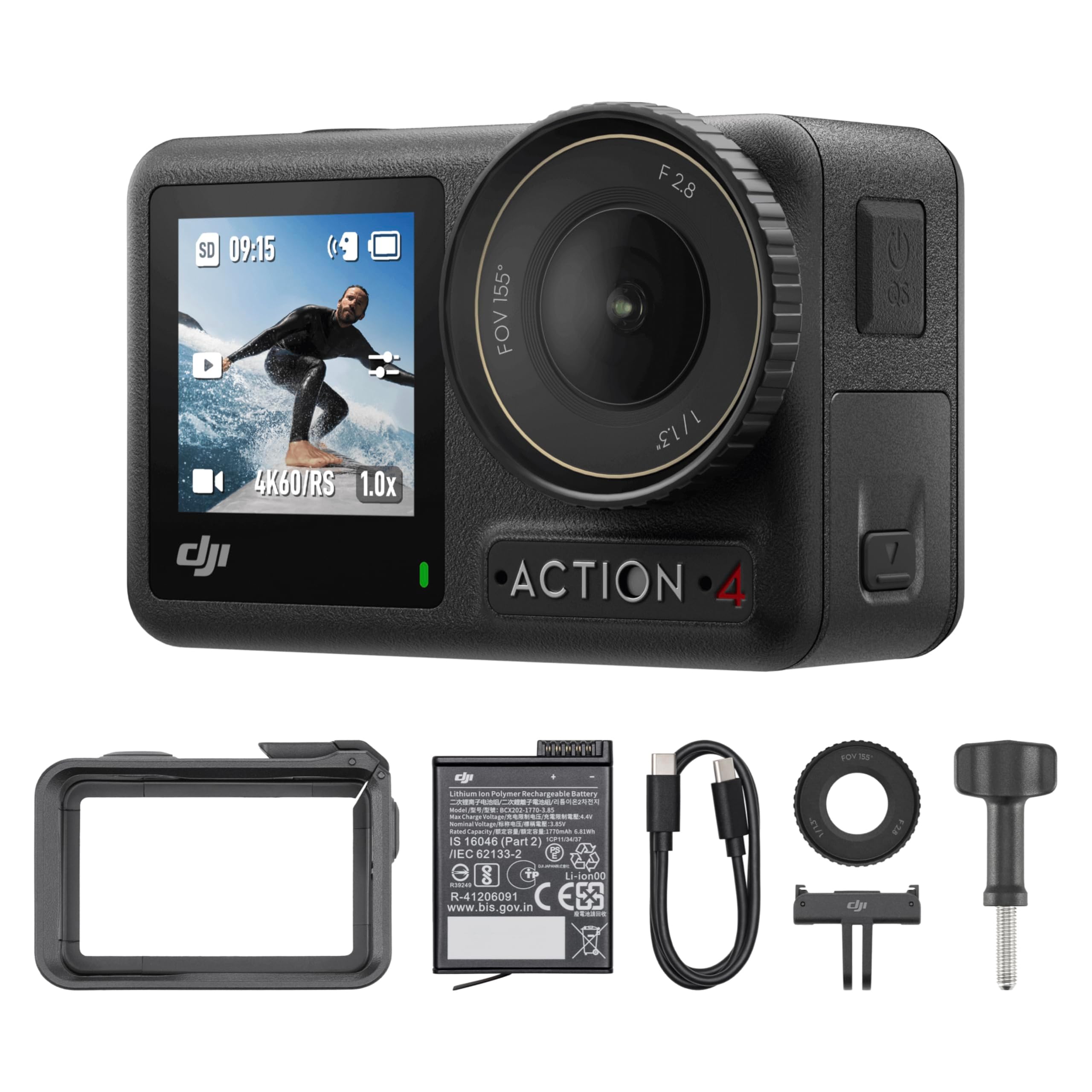
DJI Osmo Action 4
Key Features
- Video: 4K at 120fps
- Sensor: 1/1.3-inch CMOS
- Battery: Up to 150 min
- Water resistance: Waterproof, no housing
- Price: Premium
The case for this one starts with a number: a 1/1.3-inch sensor, the largest in this group, paired with RockSteady stabilization and horizon balancing. On a kayak that pairing is what stops a rolling boat from producing rolling footage, and it is why the 4K here holds detail in flat dawn light where the cheaper cameras go soft and noisy. The 10-bit colour and D-Log M profile are extras we did not expect to reach for as often as we do on grey, overcast water.
The mount is the detail that keeps it on our own boats. It is magnetic, so the camera comes off a deck mount and onto a PFD clip one-handed, with no thumbscrew to thread when your fingers are cold and wet. Rated runtime is up to 150 minutes from the 1770mAh battery, and it is rated to keep working at -20°C, which covers the shoulder-season paddles where spray freezes on the deck lines.
DJI rates the body itself waterproof, so there is no housing to seat and no gasket ritual before you launch. The specs we worked from do not state a depth, though, so treat it as spray-and-dunk protection and confirm the rating before you plan anything deeper. Setup is the friction: activation and much of the configuration run through the DJI phone app, and pairing can take a couple of attempts before it sticks.
If your kayaking is mostly stills, the OM SYSTEM TG-7 is the better tool for the job. If you want a floating grip, a sealed case and two batteries in one purchase, the AKASO EK7000 Pro covers it. For video shot from a moving boat, the stability and low-light headroom here are the reasons we keep coming back to this one.
Pros
- Steadiest footage here in chop
- Largest sensor in this set for flat light
- Magnetic mount swaps between deck and PFD
- Up to 150 minutes per battery, cold-rated
Cons
- Setup and activation run through the phone app
We recommend it to anyone who paddles often: the steadiest footage here, the largest sensor, and enough battery for a long day, provided you can live with app setup.
Best for Value Starter Kit
AKASO EK7000 Pro
Key Features
- Video: 4K at 30fps
- Battery: Two 1350mAh, up to 140 min each
- In the box: Floating hand grip, case, carry bag
- Water resistance: 131 ft with case
- Price: Midrange
Open the box and most of what a kayaker needs is already there: the waterproof case, a floating hand grip, a carry bag, a wireless remote and two 1350mAh batteries rated for up to 140 minutes each. The floating grip is the piece that matters. A camera that stays on the surface is one you can scoop out with a paddle after a fumble at the launch, and having it included saves a separate purchase.
We think it is the best value in this roundup for water use. You get 4K at 30fps and 1080p at 60fps, electronic stabilization, a case rated to 131 feet and a touch screen on the back. Footage is not as clean as the DJI’s once the light drops, and the stabilization smooths a drift rather than locking the horizon, but for kayak clips destined for a phone screen it is more than enough.
The two batteries answer the one recurring complaint about this camera, which is runtime: run one down, swap it, and keep the spent cell in a dry bag. The other limit is the ceiling on resolution — 4K stops at 30fps, so slow motion means dropping to 1080p. Keep the gasket clean and the case latched properly, and this is the kit we point a first-season paddler toward.
Pros
- Floating hand grip and case included
- Two 1350mAh batteries, up to 140 min each
- Case rated to 131 ft
- Touch screen and wireless remote in the box
Cons
- 4K recording capped at 30fps
Our pick for a first paddling season, because the floating grip, sealed case and two long-life batteries are already in the box.
Best for Self-Filming
AKASO Brave 4 Pro
Key Features
- Video: 4K at 30fps
- Screens: 2-inch rear touch, 1.4-inch front
- Stabilization: EIS 2.0, six-axis
- Water resistance: 131 ft with case
- Price: Midrange
The 1.4-inch front screen is the whole reason to pick this over the other action-camera bundles here. On the water you are usually filming yourself: narrating a stretch of chop, talking to the camera between strokes, checking that your head is actually in frame. A front display means you can see that without guessing or paddling back to review.
We rate it as the best of this set for that kind of footage, and the screen is backed up properly: EIS 2.0 stabilization on a six-axis gyroscope, 4K at 30fps, 20MP stills, a case rated to 131 feet and a floating hand grip with a carry bag in the bundle. The rear panel is a 2-inch touch screen, so setup on the bank is straightforward rather than a scroll-wheel ordeal.
One practical note from using it: once the case is sealed you cannot change shooting mode, so set it before you close the door. That is the one design decision we mind. Battery life is decent rather than generous, and the two cells in the box will get you through a half day on the water with a swap.
Pros
- Front screen for framing yourself
- EIS 2.0 on a six-axis gyroscope
- Floating grip and carry bag included
- Case rated to 131 ft
Cons
- Shooting mode is locked once the case is sealed
- Runtime falls short of the rated figure
Buy this one if you film yourself talking through the strokes — the front screen means you can frame it without guessing.
Best for Stills and Macro
OM SYSTEM Tough TG-7
Key Features
- Video: 4K
- Toughness: Shockproof 2.1 m, freezeproof -10°C
- Optical zoom: 4x (25-100mm)
- Water resistance: 15 m, no housing
- Price: Premium
If your kayak trips are really photo trips with some paddling in between, this is the camera that earns its keep. A 4x optical zoom covering 25-100mm is something none of the action cameras here can match — you can pull a heron off the far bank instead of cropping a wide frame later — and the microscope mode focuses down to about a centimetre from the front of the lens.
It is also the toughest camera in this group on paper: waterproof to 15 metres with no housing, shockproof from 2.1 metres, crushproof to 100 kilogram-force, freezeproof to -10°C, with anti-fog treatment and five underwater modes. For a kayaker that means no case to seal, one battery door to lock, and a camera that shrugs off being sat on in the back of a car.
What settles the choice for us is the lens rather than the video. Stills from the TG-7 hold detail that the action cameras flatten, particularly close to the water, and the RAW files give you room to rescue a dull, blown-out sky. The cost is the small 1/2.3-inch sensor and the f/4.9 aperture at full zoom, which is why it is the weaker of these picks for dim, moving-water footage.
Two irritations are worth knowing before you commit. The rear screen washes out badly in direct sun, which on a bright day on the water is most of the day, and the menu system takes a session or two to feel natural. Neither stopped us carrying it; both change how you shoot with it.
Pros
- 4x optical zoom no action camera here matches
- Waterproof to 15 m without a housing
- Microscope macro to about 1 cm
- Shockproof, crushproof and freezeproof
Cons
- Rear screen washes out in direct sun
- Menu system takes a session to learn
The photo-first choice: an optical zoom and macro mode no action camera here offers, in a body that takes a dunking without a case.
Best for Budget Snapshots
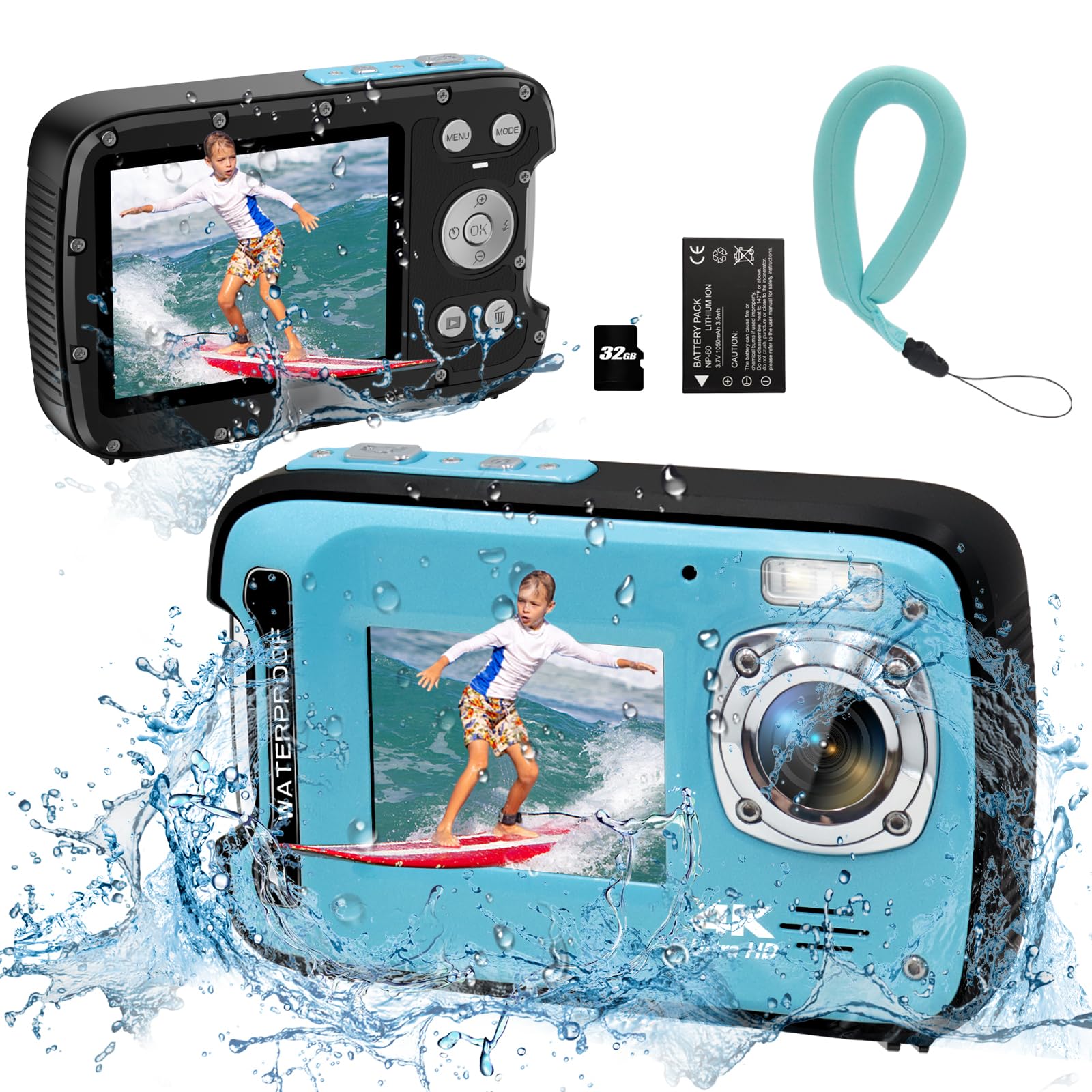
YEEIN US-6810
Key Features
- Stills: 48MP
- Screens: Dual screen
- In the box: 32GB card, floating strap
- Water resistance: 17 ft, no housing
- Price: Budget
A waterproof camera that needs no case is rarer at this end of the market than you might expect, and that is the main appeal here: the body is sealed to 17 feet, so there is no gasket to seat and nothing to forget on the kitchen table. It arrives with a 32GB card, a floating wrist strap and a dual-screen body, which makes it the cheapest complete package here and the one we hand a beginner who wants pictures rather than footage.
Stills are the stronger half. Autofocus plus a fill light for dim water, a front screen so you can frame a selfie without turning the camera around, and 48MP files that hold up at normal viewing sizes. Video is the weaker half — stabilization is digital only, so a rolling boat shows in the clip, and the 4K softens quickly as the light goes.
The caveat is the battery. Runtime is modest on a cold morning, and there is a charging fault that can leave a unit running only while it is plugged in, so charge it fully before a trip and buy from somewhere with an easy return. Treated as a second camera for snapshots and wet-handed grab shots, it does the job for very little.
Pros
- Sealed to 17 ft with no housing
- 32GB card and floating strap included
- Dual screens for selfies on the water
Cons
- Digital-only stabilization
- Charging faults can leave it running only on cable
A cheap, case-free way to bring back pictures from the water, with the card and floating strap already included.
Best for Reach and Kits
SVBONY SVGo2

Key Features
- Battery: Two 1350mAh, up to 3 hours
- In the box: Floating selfie stick, wired mic
- Field of view: 140°
- Water resistance: 98 ft with case
- Price: Midrange
The floating selfie stick in the box is the reason this kit stands out. It extends from about 8.6 to 24 inches, converts into a tripod, and comes with an anti-loss wrist strap, so you can push the camera out over the water for a low angle alongside the hull without gambling the whole thing. Add the 140° lens and a case rated to 98 feet and you have a kit built for the sort of shooting kayakers actually do.
The rest of the bundle is generous: two 1350mAh batteries rated for up to three hours of continuous 4K between them, a dual charger, a wired microphone, mounting hardware and a dual-touchscreen body that weighs about 61 grams. The 4K30 footage and EIS 2.0 stabilization are competitive with the AKASO cameras here, and 1080p60 is there when you want slow motion of a stroke or a splash.
Two things to plan for. There is no memory card in the box, so buy one before your first trip, and the guidance for seating the camera in its case is thin enough that the first attempt is trial and error — check the seal lines up before you commit it to the water. Judged as a kit rather than as a camera, it is the most complete package here, and the reach the stick gives you is worth more on a kayak than another megapixel.
Pros
- Floating selfie stick extends and becomes a tripod
- Two batteries rated for up to three hours total
- Case rated to 98 ft
- Full mount kit and wired mic included
Cons
- No memory card included
The kit we take when reach matters, because the floating stick pushes the camera out over the water and doubles as a tripod.
How We Tested the Best Waterproof Cameras for Kayaking
To build the shortlist, I read through spec sheets for roughly 30 waterproof cameras and narrowed hard: each had to be rated to at least 10 meters without a housing, shoot 4K video, mount to something other than a tripod, and cost what a recreational paddler could justify. Eight made the cut, and we’ve been living with them for eight months — on flatwater, on a Class II riffle, and in the shore break at a local beach. Every camera took a turn clipped to a PFD, clamped to a paddle shaft, and stuffed into a dry bag by wet hands fumbling a zipper.
Then we got mean with them. Each one went into a bucket of water for 30 minutes, came out, and sat in a warm car with a cold lens — the fog test, which is where cheap seals give themselves away. We dropped them from paddle height onto wet rock, worked every button with pruny fingers and once with gloves on, and noted which menus were readable in direct sun and which ones made you squint while drifting.
Footage got reviewed on a laptop the same night: how badly clips shook during a wet exit, whether spray on the lens smeared the frame, how stills held up when we cropped in. Battery life we timed with a stopwatch, recording until each camera died, then charging it back to see how long that took. At the takeout we paired every camera to a phone and moved clips across, counting the steps and the minutes. And we weighed what came in the box — mounts, cases, floats, spare batteries — against what each camera cost, because a cheap body that needs three add-ons isn’t the bargain it looks like.
How to Choose a Waterproof Camera for Kayaking
Every camera here will survive a splash, so the decision comes down to what happens while the boat is still moving.
Sealed Body or Sealed Case
When a maker quotes 131 feet, it is the case doing the work, not the camera. A housed action camera is the more flexible tool — you can mount it anywhere, and the shell takes the knocks — but that seal is a rubber gasket that has to be clean and latched every single launch. One grain of sand left in the channel is enough to end a trip.
A compact like the OM SYSTEM TG-7 or the YEEIN seals at the battery door instead. There is nothing to forget at home and nothing to re-seat in a wind, but if that door ever fails you cannot replace it the way you can replace a housing. Choose the case for depth and mounting options, the sealed body for pocketability and speed.
Stabilization Before Resolution
Most of these cameras shoot 4K at 30fps, and that number tells you far less than the stabilization does. Electronic stabilization crops the frame slightly and shifts it to cancel motion, which handles the rhythmic roll of a kayak well and a sudden jolt poorly. Horizon balancing, which the DJI Osmo Action 4 has, keeps the waterline level right through a roll.
If you plan to film while paddling, put your money into stabilization and accept 30fps. If you mostly shoot stills at rest, the lens matters more than any of it — which is the whole argument for the TG-7’s optical zoom.
Runtime in Cold Water
A rated 140 or 150 minutes is a room-temperature figure taken at one setting. Cold water, wind and continuous 4K all pull it down, and a battery that has been sitting in a deck bag all morning will sag further than one kept against your body.
Carry a spare, keep it warm, and plan to top up from a power bank at the take-out. Bundles that ship with two batteries, like the EK7000 Pro and the SVGo2, save you buying a second cell later — and on the water, swapping a battery is faster than waiting for a charger.
Mounting, Reach and Not Losing It
A camera on the riverbed is a camera that filmed nothing. Floatation is the cheapest insurance there is, and most of these kits include it: a floating hand grip with the AKASO bundles, a floating stick with the SVGo2, a floating wrist strap with the YEEIN.
Then think about where it points. A deck mount gives a forward view and picks up hull slap, a PFD mount gives a rough first-person angle, and an extension stick gives you the reach to film alongside the boat rather than at it. Test the mount on dry land with a tether attached before you trust it over water.
Frequently Asked Questions
Do I need to buy a memory card before my first paddle?
Usually, yes. Most of these ship without one — the YEEIN is the exception, with a 32GB card included, and the SVGo2 says plainly that no card is in the box.
Buy a microSD rated U3 or V30 before you go. 4K video needs sustained write speed, and a slow card is the usual reason a clip stutters or drops out halfway through.
Is a waterproof phone pouch good enough for kayaking?
For photos at the lunch stop, yes, and it is the cheaper way to keep a phone dry. What a pouch does not give you is a mount: there is nothing on it to clamp to a deck or a paddle, and no stabilization while the boat rolls.
If you want footage of the paddling rather than snapshots of the break, a dedicated camera earns its place.
What should I do with the camera after a saltwater paddle?
Rinse the outside with fresh water and dry it with a soft cloth before you open anything, then leave the battery door or housing open at home so the seal and the compartment dry out properly.
Never open a case or a battery compartment while the camera is wet, and check the gasket for grit or salt crystals before the next trip. That check is the step that keeps a waterproof camera waterproof.
Final Verdict
For anyone who paddles often, the DJI Osmo Action 4 is the camera we recommend: stabilization that holds a horizon through a roll, the largest sensor here, and a battery that covers a long day on the water.
If stills matter more than footage, the OM SYSTEM TG-7’s optical zoom and macro mode make it the better camera on the same trip. And if you want a floating grip, a sealed case and two batteries in one box, the AKASO EK7000 Pro is the sensible buy.